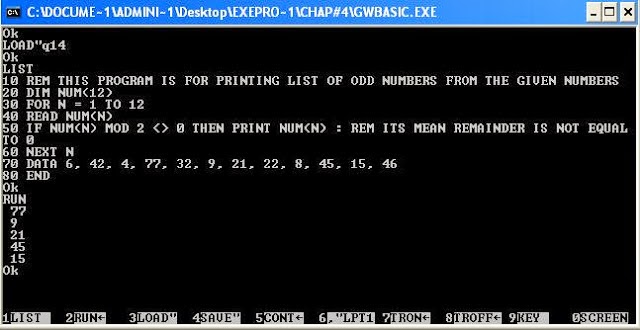
( ) parentheses
1
^ (Exponent)
2
- (Negation)
3
*, / ( Multiplication or Division)
4
MOD (Modulus)
5
+, - ( Addition or Subtraction)
6
\ (Integral Division)
7
<>, <=, >=, <, >. (Relational operators)
8
NOT
9
AND
10
OR
11
= ( assignment Operator)
12

|
Code
|
Message
|
|
1
|
NEXT without FOR
NEXT statement
does not have a corresponding FOR statement. Check
variable at FOR statement for a match with the NEXT statement variable.
|
|
2
|
Syntax error
A
line is encountered that contains an incorrect sequence of characters (such
as unmatched parentheses, a misspelled command or statement, incorrect
punctuation). This error causes GW-BASIC to display the incorrect line in
edit mode.
|
|
3
|
RETURN without GOSUB
A RETURN statement is encountered for which there is no
previous GOSUB statement.
|
|
4
|
Out of DATA
A READ statement is executed when there are no DATA statements with unread data remaining in the
program.
|
|
5
|
Illegal function call
An
out-of-range parameter is passed to a math or string function. An illegal
function call error may also occur as the result of:
a
negative or unreasonably large subscript
a
negative or zero argument with LOG
a
negative argument to SQR
a
negative mantissa with a noninteger power
a
call to a USR function for which the starting address has not yet been given
an
improper argument to MID$, LEFT$, RIGHT$, INP, OUT, WAIT, PEEK, POKE, TAB, SPC, STRING$, SPACE$, INSTR, orON...GOTO
|
|
6
|
Overflow
The
result of a calculation is too large to be represented in GW-BASIC's number format.
If underflow occurs, the result is zero, and execution continues without an
error.
|
|
7
|
Out of memory
A
program is too large, has too many FOR loops, GOSUBs, variables, or expressions that are too
complicated. Use the CLEAR statement to
set aside more stack space or memory area.
|
|
8
|
Undefined line number
A
line reference in a GOTO, GOSUB, IF-THEN...ELSE, or DELETE is a nonexistent line.
|
|
9
|
Subscript out of range
An
array element is referenced either with a subscript that is outside the
dimensions of the array, or with the wrong number of subscripts.
|
|
10
|
Duplicate Definition
Two DIM statements are given for the same array, or
a DIM statement is given for an array after the
default dimension of 10 has been established for that array.
|
|
11
|
Division by zero
A
division by zero is encountered in an expression, or the operation of
involution results in zero being raised to a negative power. Machine infinity
with the sign of the numerator is supplied as the result of the division, or
positive machine infinity is supplied as the result of the involution, and
execution continues.
|
|
12
|
Illegal direct
A
statement that is illegal in direct mode is entered as a direct mode command.
|
|
13
|
Type mismatch
A
string variable name is assigned a numeric value or vice versa; a function
that expects a numeric argument is given a string argument or vice versa.
|
|
14
|
Out of string space
String
variables have caused GW-BASIC to exceed the amount of free memory remaining.
GW-BASIC allocates string space dynamically until it runs out of memory.
|
|
15
|
String too long
An
attempt is made to create a string more than 255 characters long.
|
|
16
|
String formula too complex
A
string expression is too long or too complex. Break the expression into
smaller expressions.
|
|
17
|
Can't continue
An
attempt is made to continue a program that
Has
halted because of an error
Has
been modified during a break in execution
Does
not exist
|
|
18
|
Undefined user function
A
USR function is called before the function definition (DEF statement) is given.
|
|
19
|
No RESUME
An
error-trapping routine is entered but contains no RESUME statement.
|
|
20
|
RESUME without error
A RESUME statement is encountered before an
error-trapping routine is entered.
|
|
21
|
Unprintable error
No
error message is available for the existing error condition. This is usually
caused by an error with an undefined error code.
|
|
22
|
Missing operand
An
expression contains an operator with no operand following it.
|
|
23
|
Line buffer overflow
An
attempt is made to input a line that has too many characters.
|
|
24
|
Device Timeout
GW-BASIC
did not receive information from an I/O device within a predetermined amount
of time.
|
|
25
|
Device Fault
Indicates
a hardware error in the printer or interface card.
|
|
26
|
FOR Without NEXT
A FOR was encountered without a matching NEXT.
|
|
27
|
Out of Paper
The
printer is out of paper; or, a printer fault.
|
|
28
|
Unprintable error
No
error message is available for the existing error condition. This is usually
caused by an error with an undefined error code.
|
|
29
|
WHILE without WEND
A WHILE statement does not have a matching WEND.
|
|
30
|
WEND without WHILE
A WEND was encountered without a matching WHILE.
|
|
31-49
|
Unprintable error
No
error message is available for the existing error condition. This is usually
caused by an error with an undefined error code.
|
|
50
|
FIELD overflow
A FIELD statement is attempting to allocate more bytes
than were specified for the record length of a random file.
|
|
51
|
Internal error
An
internal malfunction has occurred in GW-BASIC. Report to your dealer the
conditions under which the message appeared.
|
|
52
|
Bad file number
A
statement or command references a file with a file number that is not open or
is out of range of file numbers specified at initialization.
|
|
53
|
File not found
A LOAD, KILL, NAME, FILES, or OPEN statement references a file that does not
exist on the current diskette.
|
|
54
|
Bad file mode
An
attempt is made to use PUT, GET, or LOF with a sequential
file, to LOAD a random file, or to execute an OPEN with a file mode other thanI, O, A, or R.
|
|
55
|
File already open
A
sequential output mode OPEN is issued for a
file that is already open, or a KILL is given for a
file that is open.
|
|
56
|
Unprintable error
An
error message is not available for the error condition which exists. This is
usually caused by an error with an undefined error code.
|
|
57
|
Device I/O Error
Usually
a disk I/O error, but generalized to include all I/O devices. It is a fatal
error; that is, the operating system cannot recover from the error.
|
|
58
|
File already exists
The
filename specified in a NAME statement is identical
to a filename already in use on the diskette.
|
|
59-60
|
Unprintable error
No
error message is available for the existing error condition. This is usually
caused by an error with an undefined error code.
|
|
61
|
Disk full
All
disk storage space is in use.
|
|
62
|
Input past end
An INPUT statement is executed after all the data in
the file has been input, or for a null (empty) file. To avoid this error, use
the EOFfunction to detect the end of file.
|
|
63
|
Bad record number
In
a PUT or GET statement, the
record number is either greater than the maximum allowed (16,777,215) or
equal to zero.
|
|
64
|
Bad filename
An
illegal form is used for the filename with LOAD, SAVE, KILL, or OPEN; for example, a
filename with too many characters.
|
|
65
|
Unprintable error
No
error message is available for the existing error condition. This is usually
caused by an error with an undefined error code.
|
|
66
|
Direct statement in file
A
direct statement is encountered while loading a ASCII-format file. The LOAD is terminated.
|
|
67
|
Too many files
An
attempt is made to create a new file (using SAVE or OPEN) when all directory
entries are full or the file specifications are invalid.
|
|
68
|
Device Unavailable
An
attempt is made to open a file to a nonexistent device. It may be that
hardware does not exist to support the device, such as lpt2: or lpt3:, or is
disabled by the user. This occurs if an OPEN "COM1: statement is
executed but the user disables RS-232 support with the /c: switch directive
on the command line.
|
|
69
|
Communication buffer overflow
Occurs
when a communications input statement is executed, but the input queue is
already full. Use an ON ERROR GOTO statement
to retry the input when this condition occurs. Subsequent inputs attempt to
clear this fault unless characters continue to be received faster than the
program can process them. In this case several options are available:
Increase
the size of the COM receive buffer with the /c: switch.
Implement
a hand-shaking protocol with the host/satellite (such as: XON/XOFF, as
demonstrated in the TTY programming example) to turn transmit off long enough
to catch up.
Use
a lower baud rate for transmit and receive.
|
|
70
|
Permission Denied
This
is one of three hard disk errors returned from the diskette controller.
An
attempt has been made to write onto a diskette that is write protected.
Another
process has attempted to access a file already in use.
The UNLOCK range specified does not match the
preceding LOCK statement.
|
|
71
|
Disk not Ready
Occurs
when the diskette drive door is open or a diskette is not in the drive. Use
an ON ERROR
GOTO statement to recover.
|
|
72
|
Disk media error
Occurs
when the diskette controller detects a hardware or media fault. This usually
indicates damaged media. Copy any existing files to a new diskette, and
reformat the damaged diskette. FORMAT maps the bad
tracks in the file allocation table. The remainder of the diskette is now
usable.
|
|
73
|
Advanced Feature
An
attempt was made to use a reserved word that is not available in this version
of GW-BASIC.
|
|
74
|
Rename across disks
Occurs
when an attempt is made to rename a file to a new name declared to be on a
disk other than the disk specified for the old name. The naming operation is
not performed.
|
|
75
|
Path/File Access Error
During
an OPEN, MKDIR, CHDIR, or RMDIR operation,
MS-DOS is unable to make a correct path-to-filename connection. The operation
is not completed.
|
|
76
|
Path not found
During
an OPEN, MKDIR, CHDIR, or RMDIR operation,
MS-DOS is unable to find the path specified. The operation is not completed.
|
10  REM *********************************************************
20  REM *  GUESS1                                              *
30  REM *  Guess a random number selected by a BASIC program    *
40  REM *********************************************************
50  RANDOMIZE TIMER
60  NUMBER% = INT(1 + RND * 100)
70  CLS
80  PRINT "Guess a number in the range 1 and 100"
90  INPUT GUESS%
100 IF GUESS% = NUMBER% THEN GOTO 140
110 IF GUESS% > NUMBER% THEN PRINT "Too High!  Try Again"
120 IF GUESS% < NUMBER% THEN PRINT "Too Low!  Try Again"
130 GOTO 90
140 PRINT "Very Good!  You Guessed the Number."
150 END
         ABS     DATE$   GET
       AND     DEF      GOSUB
       ASC      DEFDBL    GOTO
       ATN      DEFINT         HEX$
       AUTO        DEFSNG            IF
       BEEP         DEFSTR       IMP
       BLOAD         DELETE        INKEY$
       BSAVE
       DRAW        INPUT
       CDBL         EDIT       INPUT#
       CHAIN                      ELSE      INPUT$
       CHDIR                      END          INSTR
       CHR$                       ENVIRON      INT
       CINT                       ENVIRON$      INTER$
       CIRCLE                     EOF          IOCTL
       CLEAR                      EQV           IOCTL$
       CLOSE                      ERASE          KEY
       CLS                        ERDEV           KILL
       COLOR                      ERDEV$        LEFT$
       COM                        ERL             LEN
       COMMON                     ERR          LET
       CONT                       ERROR           LINE
       COS                        EXP            LIST
       CSNG                       FIELD         LLIST
       CSRLIN                     FILES      LOAD
       CVD                        FIX            LOC
       CVI                        FNxxxxxxxx     LOCATE
       CVS                        FOR            LOF
       DATA                       FRE              LOG
       LPOS                       POS              STICK
       LPRINT                     PRESET         STOP
       LSET                       PRINT          STR$
       MERGE                      PRINT#         STRIG
       MID$                       PSET            STRING
       MKDIR                      PUT            SWAP
       MKD$                       RANDOMIZE      SYSTEM
       MKI$                       READ           TAB(
       MKS$                       REM            TAN
       MOD                        RENUM           THEN
       MOTOR                      RESET           TIME$
       NAME                       RESTORE       TIMER
       NEW                        RESUME         TO
       NEXT                       RETURN         TROFF
       NOT                        RIGHT$       TRON
       OCT$                       RMDIR     USING
       OFF                        RND          USR
       ON                         RSET        VAL
       OPEN                       RUN            VARPTR
       OPTION                     SAVE      VARPTR$
       OR                         SCREEN      VIEW
       OUT                        SGN             WAIT
       PAINT                      SHELL         WEND
       PEEK                       SIN            WHILE
       PEN                        SOUND         WIDTH
       PLAY                       SPACE$       WINDOW
       PMAP                       SPC(          WRITE
       POINT                      SQR           WRITE#
       POKE                       STEP          XOR
The DATA statements can also supply more that one variable with each READ. To do this, separate each piece of data by a comma. The READ must then use more than one variable name. Try this program:10 FOR X% = 1 TO 3 20 READ FIRST$,SECOND$,THIRD% 30 PRINT FIRST$ SECOND$ THIRD% 40 NEXT X% 50 END 60 DATA Call,me,1 70 DATA Call,me,2 80 DATA Call,me,3Each piece of data in a DATA statement is called a FIELD. The fields are separated by commas. When they are read, the first field is placed in the first variable name of the READ statement. The second field is placed in the second variable, and so on. The variable type must match the type of data. For example, the integer variable THIRD% in the READ on line 20 can only be used to hold whole numbers. An error message is issued if you try to place letters into an integer variable. This works just like INPUT.If a field in a DATA statement contains commas, semicolons (;), or many blank spaces, that field must be enclosed in quotation marks.Each time a READ statement is executed it gathers the input from the next DATA statement. Therefore, one DATA statement must exist for each time READ executes. If a READ is executed after all DATA statements have been processed, BASIC issues the error message Out of Data and the program ends.
 |
| concatenation is the process in which the airthmetic plus sign joins with two string to make them count count 1 for example 1+1 = 2 but in string a+a=aa and in string it is called concatination. |